
Lorenz SZ40 Cipher Machine
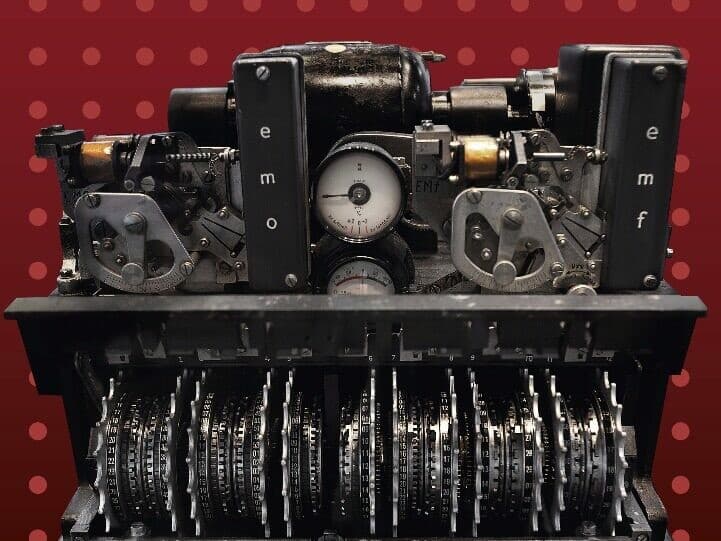
As part of my university education, I was tasked to recreate the Lorenz SZ40 Cipher Machine, an old World War II encryption machine that the Germans built to succeed Enigma.
A complex machine, I was to implement this in software by using C++. Once completed, it became my go-to 'Hello, world' project. When learning a new technology or language, I use this machine as my method for learning the language and tooling.
Technologies used
- Languages: C++, C#, Delphi, Typescript
- Development Tools: Delphi 10.2, Visual Studio, Visual Studio Code
- Source Control: GitHub
How it works
The Lorenz SZ40 was a German cipher machine used during World War II to keep military messages secret. It worked by using a series of rotating wheels to scramble messages sent over teleprinters, making them appear as gibberish to anyone intercepting them. This complex system was far more advanced than the famous Enigma machine and inspired some of the earliest breakthroughs in modern computing when Allied codebreakers set out to crack it.
My software is not an emulator -- I.e. it does not use a rough approxiation of what the machine did to end up with the same result; My implementation perfectly simulates the entire device.
From the structure of the wheels, to the shifting pattern that is created by them turning. It is perfectly simulated within software and within the various implementations I have created.
C++ Application (Console/Terminal)
The original version was written in C++, using standard C++ tooling. It was written using Visual Studio 2012 and does not contain any external libraries, other than the standard C++ library for IO.
See it in action below! Please note that the black frames in the clip are a result of capturing the window, and are not visible to you when running the app.

While it is a terminal app, it also contains a GUI style presentation. You can navigate this menu using keypresses and as you can see, it's fully featured.
You can also pass it arguments in the command line if you want to use it without any GUI. It will spit you out text directly via this method without interruption.
1lorenz.exe -encrypt "HELLO WORLD" -key "SECRETKEY"You can download the C++ variant executable for Windows here, or grab the source code from Github at the link above.
C# Application
The first and most obvious tech to port the project to was C#. It is a C-like language with a very similar language, but actually a much easier one.
This was my first C# WinForms application and... Well it shows. It's not pretty but absolutely does get the job done. It's actually great porting something like this across to another language because it forces you to really understand the platform and technology you're porting it to.

The application is not pretty as I was still new to WinForms GUI (Something I would have to get very aquianted to in my professional career in the years ahead) and I did not use multithreading on this project, so performance leaves a lot to be desired.
Still, I was learning and very happy with the result at the time, and it maintains the same perfect accuracy as the original C++ version.
You can download the C# variant executable for Windows here. It will be dependent on having some old version of the .NET framework installed! You can also grab the source code from Github at the link above.
Delphi Application
The Delphi version of this app is my favourite so far.
When I started working at my most recent job, I knew that Delphi was the primary language that I would be using. With this in mind, it was time to re-write my Lorenz SZ40 implementation!

I absolutely love Delphi and this was an incredibly simple version to implement. Managing memory in Delphi is a dream compared to C++, and the Object Pascal syntax is so readable and usable.
It is very efficient, uses perfect Delphi coding standards, and I'm extremely happy with the code here.
You can download the Delphi variant executable for Windows here. It should work on basically any Windows version you throw it at, and as always, I'd love you to check out the code on Github.